Application Engineering
Introduction
With AI Platform Engineering providing the hardened, core "Hub" platform infrastructure, Data Engineering for AI managing the high-dimensional context fabrics, and AI/ML Engineering implementing specialized, state-bound agent architectures, the remaining organizational pillar required to complete the delivery loop is Application Engineering.
For technology executives, failing to decouple Application Engineering from AI/ML Engineering is a primary source of timeline slippage and technical debt in enterprise projects. A common anti-pattern is tasking specialized AI/ML Engineers, who should spend their time on context window pruning, semantic schema enforcement, and state machine tuning, with building end-user interfaces, handling WebSockets, managing frontend browser states, or writing standard REST integration endpoints.
To achieve industrial-scale velocity, the enterprise operating model must treat Application Engineering as the primary consumer of the AI platform's capabilities. Application Engineers focus on integration, user experience (UX), and the deterministic glue that binds probabilistic intelligence engines to everyday corporate workflows.
1. Demarcating Application Engineering in the AI Lifecycle
The primary distinction between an AI/ML Engineer and an Application Engineer lies in their relationship to the probabilistic boundary.
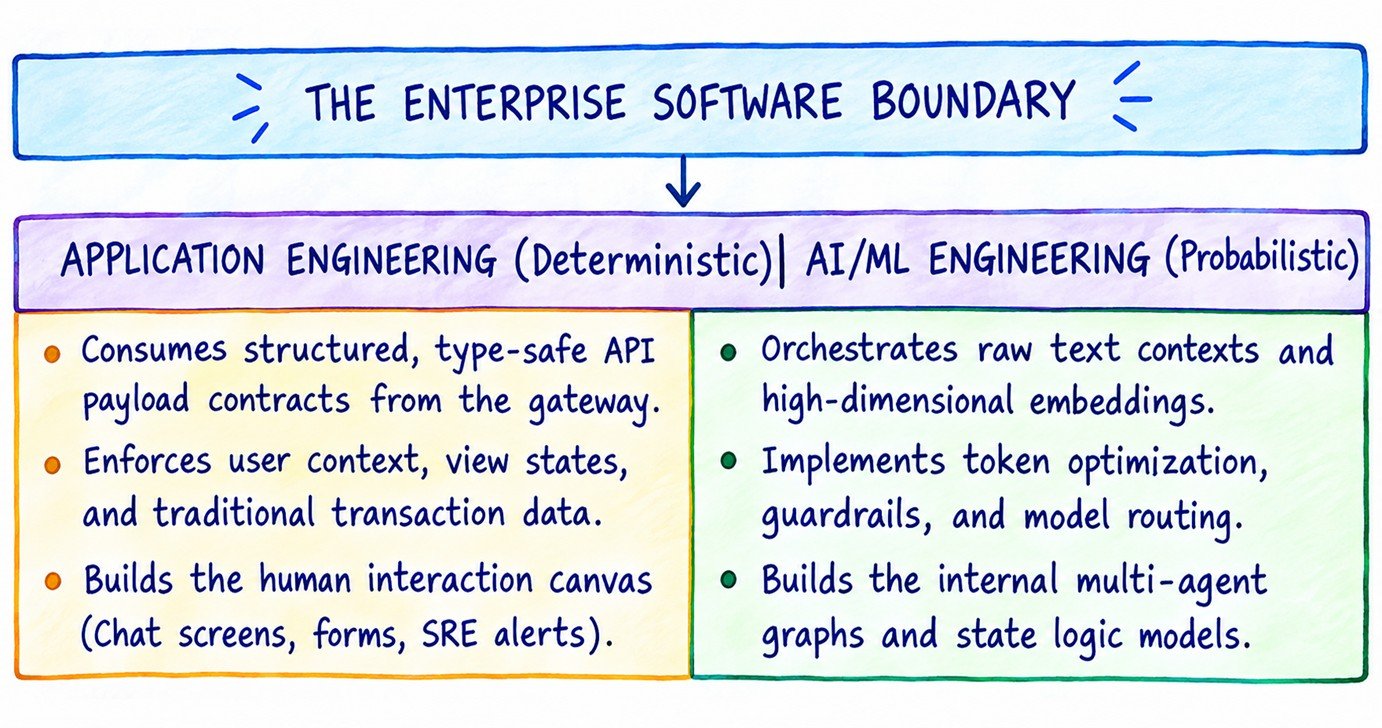
The Application Engineer operates completely on the deterministic side of the boundary. They do not write system prompts, adjust model hyperparameters, configure chunk overlapping algorithms, or manage vector index topologies. Instead, they treat the unified AI Platform as a standard, type-safe REST or gRPC microservice endpoint. Their engineering responsibility is to build the application logic that wraps this intelligence and delivers it intuitively to enterprise users.
2. Core Engineering Disciplines for AI-Infused Applications
When traditional application developers begin integrating large language models into frontend interfaces and enterprise workflows, they must adapt their practices to accommodate the unique characteristics of conversational, asynchronous, and streaming web backends.
2.1 Managing High-Performance Token Streaming
Unlike traditional web services that return a complete JSON payload in a single HTTP response, Generative AI models generate text sequentially, token by token. Waiting for a model to finish compiling a 500-token analysis statement before returning the payload to the UI results in severe latency spikes and a poor user experience.
Application Engineers must master Server-Sent Events (SSE) and WebSocket architectures. They build resilient streaming parsers on the frontend that can accept a continuous chunk-by-chunk stream of tokens, handle partial JSON strings gracefully, and render content smoothly on the screen without causing browser re-rendering lags or UI layout shifts.
2.2 Optimizing Conversational State & UX Paradigm Switches
Classic enterprise software is built around tabular views, forms, and explicit click actions. AI-native software introduces chat interfaces, natural language filtering, and assistive typing canvases.
- State Hydration & Session Resilience: Conversational interfaces are highly state-dependent. Application Engineers must design reliable server-side caching mechanisms to manage conversation histories without bloating database storage. They isolate session metrics, including user metadata, interface parameters, and permission tokens, and append them as headers to gateway requests, allowing the downstream context fabric to function efficiently.
- Asynchronous Processing UI States: When an application triggers a complex multi-agent DAG workflow, execution can take upwards of 30 to 60 seconds. Application Engineers design defensive UI states, such as step-by-step progress checklists, simulated processing steps, and intermediate feedback loops, to keep users engaged and prevent them from abandoning or resubmitting identical tasks, which would double token expenses.
2.3 Resilient Client-Side Fallbacks and Timeout Mitigation
Model gateways can fail, token quotas can be exceeded, and internet connections can drop mid-stream. Application Engineers write defensive error-handling logic at the UI tier:
- Partial Completion Rendering: If a connection drops while a model is streaming a response, the application layer catches the exception, closes the socket safely, and renders the generated snippet alongside a notice indicating that a network interruption occurred.
- Local UI Interceptors: If the central API gateway returns a throttling code, such as HTTP
429 Too Many Requests, the client-side code immediately catches the error, intercepts the loop, and disables the user submit inputs while providing a clean countdown message, shielding the internal platform from malicious or accidental spamming.
3. Engineering Blueprints: Real-Time Token Stream Consumer
The following JavaScript/TypeScript blueprint demonstrates how an Application Engineer consumes a streaming natural language endpoint from an enterprise gateway proxy safely, using defensive chunk parsing and rendering states.
/**
 * Enterprise Application Engineering Client Blueprint
 * Consumes streaming text blocks defensively and updates the DOM in real-time.
 */
class EnterpriseAIStreamConsumer {
    constructor(gatewayUrl, clientAuthToken) {
        this.gatewayUrl = gatewayUrl;
        this.authToken = clientAuthToken;
        this.activeAbortController = null;
    }

    /**
     * Dispatches an operational user prompt to the platform ingress gateway.
     */
    async streamIntelligencePayload(userPrompt, targetSessionId, uiUpdateCallback) {
        // Cancel any pending active network streams to avoid client race conditions
        if (this.activeAbortController) {
            this.activeAbortController.abort();
            console.warn("Aborted previous unfinished streaming payload thread.");
        }

        this.activeAbortController = new AbortController();
        const { signal } = this.activeAbortController;

        try {
            const response = await fetch(`${this.gatewayUrl}/v1/intelligence/stream`, {
                method: "POST",
                headers: {
                    "Content-Type": "application/json",
                    "Authorization": `Bearer ${this.authToken}`,
                    "X-Session-ID": targetSessionId
                },
                body: JSON.stringify({ prompt: userPrompt }),
                signal: signal
            });

            // Handle standard network error codes defensively before reading the stream
            if (!response.ok) {
                if (response.status === 429) {
                    throw new Error("RATE_LIMIT_EXCEEDED: Platform threshold reached. Please wait before retrying.");
                }
                throw new Error(`GATEWAY_ERROR: Ingress layer returned status code ${response.status}`);
            }

            const reader = response.body.getReader();
            const decoder = new TextDecoder("utf-8");
            let partialBuffer = "";

            // Stream processing read loop
            while (true) {
                const { done, value } = await reader.read();
                if (done) break;

                // Decode incoming binary chunk array data to text string characters
                const textChunk = decoder.decode(value, { stream: true });
                partialBuffer += textChunk;

                // Process Server-Sent Events pattern formatting arrays (data: {...}\n\n)
                const lines = partialBuffer.split("\n");
                // Save the incomplete final line back to the chunk string buffer
                partialBuffer = lines.pop();

                for (const line of lines) {
                    const cleanLine = line.trim();
                    if (!cleanLine || !cleanLine.startsWith("data:")) continue;

                    const jsonString = cleanLine.replace("data:", "").trim();
                    if (jsonString === "[DONE]") {
                        console.info("Stream processing transaction completed cleanly.");
                        return;
                    }

                    try {
                        const parsedData = JSON.parse(jsonString);
                        const tokenText = parsedData.choices[0].delta.content || "";

                        // Push token token snippet data string back to the user interface canvas
                        uiUpdateCallback({ status: "streaming", token: tokenText });
                    } catch (jsonErr) {
                        console.error("Failed to parse partial streaming transaction package:", jsonErr);
                    }
                }
            }

        } catch (error) {
            if (error.name === "AbortError") {
                console.info("Streaming pipeline session successfully closed by developer action.");
                uiUpdateCallback({ status: "aborted", message: "Transaction terminated by user switch request." });
            } else {
                console.error("Application processing crash intercepted:", error.message);
                uiUpdateCallback({ status: "error", message: error.message });
            }
        } finally {
            this.activeAbortController = null;
        }
    }
}

// =====================================================================
// Production Interface Testing Integration Execution Hook Example
// =====================================================================
const gatewayClient = new EnterpriseAIStreamConsumer("https://gateway.internal", "app_spoke_sec_token_99");

const mockUiEngineCallback = (event) => {
    if (event.status === "streaming") {
        // Appends single text token entries straight into view layouts
        process.stdout.write(event.token);
    } else if (event.status === "error") {
        console.error(`\nRender Error Display Component: ${event.message}`);
    }
};
4. Mapping Application Engineering to TOGAF Phase G (Implementation Governance)
To ensure consistency with the broader corporate architecture, Application Engineering activities are reviewed during TOGAF Phase G (Implementation Governance).
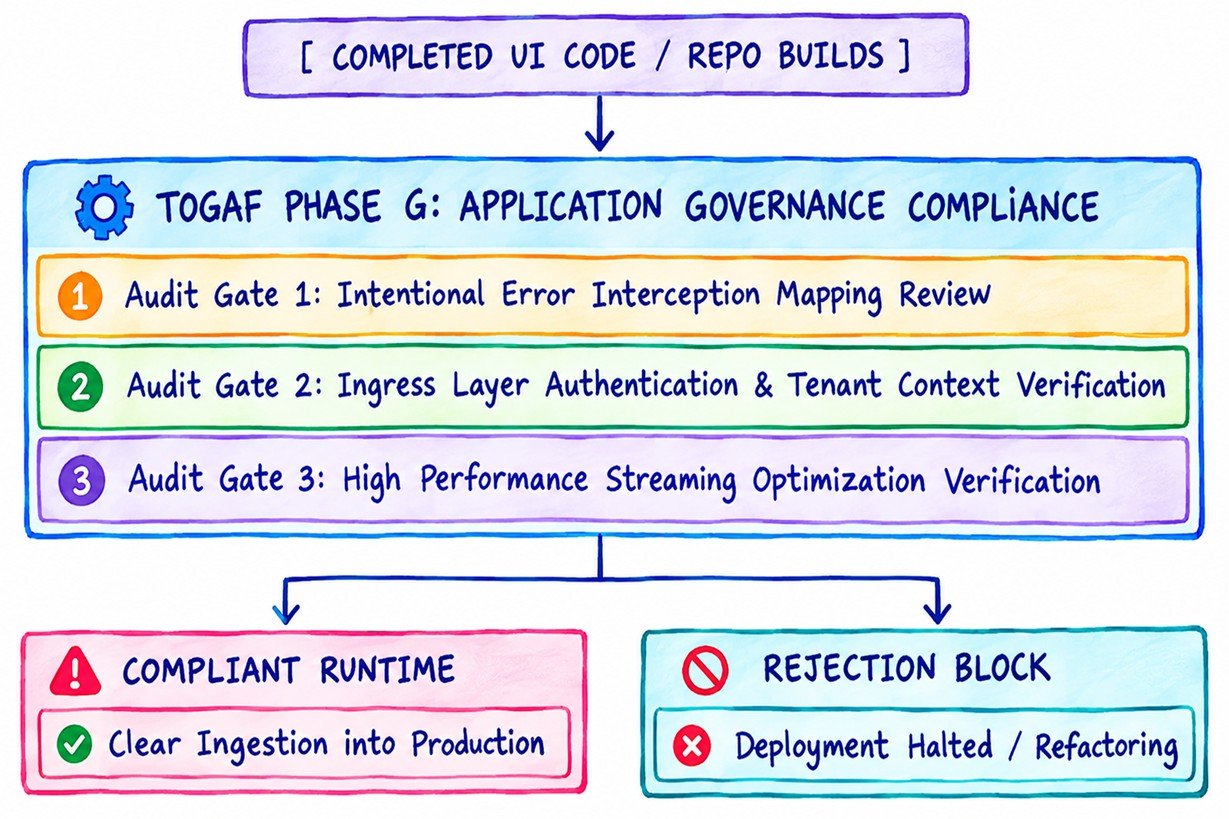
The Application Architecture governance function validates production readiness across three precise metrics:
- Error Interception and Failure Mode Compliance: T- Ensure the application gracefully handles network faults and rate limits with retry-with-jitter UIs to prevent QA rejections and protect the Idea-to-Staging Time (ITS) metric.
- Ingress Authentication Tracking: The application repository must demonstrate that it does not attempt to manage raw access keys for individual foundation models. It must show clean integration with enterprise identity mechanisms, such as OAuth2/OIDC, and pass user context headers on every call to the platform entry layer.
- Streaming Lifecycle Engineering: Code reviews confirm that client views leverage Server-Sent Event (SSE) pipelines rather than relying on synchronous blocking HTTP polling. This architecture keeps frontend responsiveness high and optimizes overall network consumption.
Architectural Disclaimer
This architectural guide and its referenced user interface rendering components are intended exclusively for educational and strategic organizational design planning purposes. Generative AI interaction environments introduce non-deterministic text generation and token streams that vary based on client network performance, browser configurations, and gateway routing statuses. Implementing production application interfaces requires rigorous usability testing, security penetration scanning, and accessibility evaluations tailored to your specific organizational constraints.