Human + AI interaction models
As enterprises transition from deterministic software architectures to probabilistic AI systems, traditional user interface (UI) and user experience (UX) paradigms break. Deterministic systems operate on logic where the same input consistently yields the same output. Probabilistic systems operate on statistical weights, meaning the system can and will make mistakes.
For technology executives—CTOs, VPs, Heads of AI, and Enterprise Architects—the challenge is no longer just model accuracy (F1 scores or perplexity); it is systemic alignment. You must build interfaces that foster trust without creating automation complacency, ensuring the human remains appropriately coupled to the loop based on the risk profile of the task.
1. The Paradigm Shift: Designing for Probabilistic Systems
Designing for artificial intelligence requires a fundamental shift from control to collaboration. When systems are wrong a percentage of the time, the user interface acts as the critical risk-mitigation layer.
The Illusion of Infallibility (Automation Bias)
When an AI system outputs highly polished, articulate text or precise-looking data visualizations, users naturally fall victim to automation bias — the tendency to trust automated suggestions blindly. If the interface does not actively communicate the underlying uncertainty, leaders risk catastrophic operational failures when a model inevitably hallucinates.
Calibrating Trust vs. Complacency
The core objective of a probabilistic UI is trust calibration.
- Under-trust leads to tech rejection, where users ignore the AI, tanking ROI.
- Over-trust (Complacency) leads to unverified errors slipping into production environments.
- Optimal Trust occurs when the user’s reliance on the AI matches the system's actual capabilities. The interface must actively prompt skepticism when the system is uncertain and validate reliance when confidence is absolute.
2. Risk-Based Interaction Governance
Enterprise architectures must map interaction models directly to the blast radius of the underlying task. You cannot apply a blanket UX design pattern across an entire enterprise suite.
| Dimension | High-Risk Tasks | Low-Risk Tasks |
|---|---|---|
| Example Domains | Medical dosing, financial trading execution, legal contract finalization, production infrastructure changes. | Content draft ideation, log categorization, email sorting, low-level data transformation. |
| Interaction Paradigm | Human-in-the-loop (HITL). The AI proposes; the human disposes. | Human-on-the-loop (HOTL) or Human-out-of-the-loop. Autonomous execution with override mechanisms. |
| Execution Policy | Explicit confirmation. Block execution until an authorized human signs off. | Implicit execution. Run asynchronously in the background. |
| Notification Strategy | Synchronous, modal-blocking alerts requiring affirmative action. | Asynchronous toast notifications, activity logs, or digest summaries. |
| Fail-Safe Mode | Rollback to last known human-validated state if confirmation times out. | Proceed with execution, flagging exceptions in a central monitoring dashboard. |
Designing High-Risk Touchpoints (Guardrail UX)
For high-risk tasks, the UI must function as an intentional friction point. Interstitial states, mandatory review screens, and diff viewers (highlighting exactly what the AI changed versus the baseline) prevent accidental "rubber-stamping."
Designing Low-Risk Touchpoints (Ambient UI)
For low-risk tasks, friction destroys velocity. The AI operates autonomously in the background. The UI shifts from a creation space to a monitoring space—using silent logs, system tray indicators, and non-intrusive notifications to maintain situational awareness without context-switching the user.
3. Core Architectural Design Patterns for AI Trust & Agency
To operationalize these principles, solutions architects must standardize a set of reusable UI component patterns that explicitly communicate model state and give users granular agency.
Pattern A: Confidence Exposure & Structural Uncertainty
Never hide the model’s statistical variance behind a clean string of text. Bring the metadata forward.
- Visual Density Gradients: Use varying background highlights or text opacities to signal token-level confidence. For example, text generated with < 70% confidence should feature a subtle underline or a distinct color background, indicating a high probability of hallucination.
- Categorized Confidence Scoring: Translate raw softmax probabilities into actionable buckets:
High,Medium, andNeeds Review. Avoid displaying raw float numbers (e.g.,0.8432) to non-technical business users; instead, group them into structural categories that map to required human actions.
Pattern B: The Triad of Agency (Regenerate, Modify, Reject)
Every AI-generated output container must feature a standard, universal toolbar granting the user three distinct vector pathways:
- Regenerate (with constraints): Do not just offer a blind "try again" button. Provide prompt-steering micro-actions (e.g., "Make more concise," "Change tone to formal," "Inject historical data").
- Modify (Inline Mutation): The generated output must instantly convert into an editable text field or canvas upon click. The user should never have to copy-paste data to an external tool to fix an AI error.
- Reject (Hard Dismissal): Clear, immediate removal of the output. This action must be treated as a high-signal event within your telemetry pipeline.
4. The Flywheel: Closed-Loop Implicit Feedback Infrastructure
The user interface is your highest-value data ingestion engine for model fine-tuning and reinforcement learning. While explicit feedback (thumbs up/down) suffers from low user engagement (< 5 percent), implicit feedback can capture near - 100% signal saturation if built directly into the interaction layer.
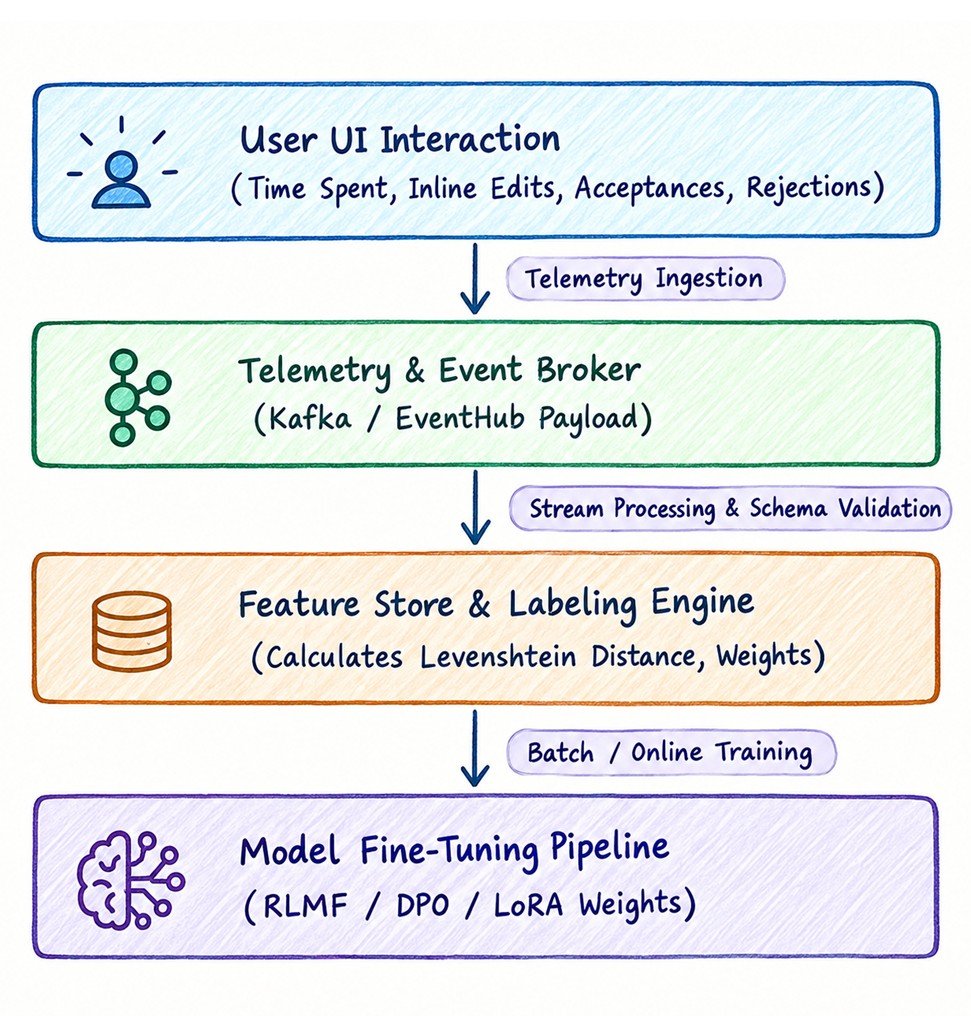
Telemetry Architecture for Implicit Signal Capture
Enterprise architects must instrument the UI to capture granular user interactions without introducing latency:
-
The Mutation Delta (Levenshtein Distance): When a user utilizes the "Modify Inline" pattern, compute the edit distance between the AI’s initial output and the final human-saved version.
- If the delta is small ( < 10% ), the AI output was highly accurate but required formatting polish.
- If the delta is massive ( > 50% ), treat the initial AI output as a functional failure.
-
Dwell Time & Scroll Velocity: Track how long an output container remains in the user’s viewport. Rapid scrolling past an AI suggestion implies irrelevance, whereas extended dwell time paired with an export or copy action signals high utility.
-
Acceptance via Assimilation: If a user clicks "Submit" or moves to the next step in a business process workflow without changing the AI-generated elements, log an implicit acceptance.
Telemetry Payload Schema Standard
Ensure your front-end telemetry events capture the full semantic context. A standardized JSON event envelope should look like this:
{
  "eventId": "evt_984321098_xyz",
  "timestamp": "2026-09-10T06:39:00Z",
  "modelConfiguration": {
    "modelName": "enterprise-llm-v4",
    "temperature": 0.2,
    "promptTemplateId": "tmpl_legal_analysis_v2"
  },
  "interactionMetadata": {
    "taskId": "task_contract_audit_881",
    "riskProfile": "HIGH",
    "confidenceScore": 0.762
  },
  "userActions": {
    "initialOutputLengthTokens": 450,
    "actionTaken": "MODIFY",
    "dwellTimeSeconds": 142.5,
    "explicitFeedback": null,
    "inlineMutation": {
      "levenshteinDistance": 34,
      "originalText": "The liability cap is set at $1M...",
      "modifiedText": "The liability cap is explicitly capped at $1M..."
    }
  }
}
Transforming Telemetry into Model Alignment
These interaction logs must feed directly into your MLOps pipeline. High-confidence completions that underwent heavy human mutation should be routed automatically to a curation queue. They can then be used as training pairs for Direct Preference Optimization (DPO) or Reinforcement Learning from Human Feedback (RLHF), creating an automated flywheel that continuously drives down system error rates based on actual human domain expertise.